 s
sA guide
How to digitize handwritten recipe cards
The simplest way to digitize a handwritten recipe card is to photograph both sides in window light, keep that photo, and turn the words into a recipe you can search and cook from. You don’t need a scanner. You do need to keep the handwriting, because that’s the part nobody can replace.
Gather them all first
Empty the recipe box, then go looking for the rest: the cards tucked inside cookbooks, the clippings with notes in the margin, the backs of envelopes. Ask your aunts and cousins what they have, because one dish often turns up in three kitchens with three different amounts. Write down who each recipe came from while someone still remembers.
Photograph each card
A phone camera is enough. Fifty cards take an evening, not a month.
- Use daylight. Set the card near a window and turn the flash off. Flash bounces off old grease spots and glossy clippings.
- Lay it flat. A plain table works. Hold a curled corner down with something small, clear of the words.
- Hold the phone straight above it, so the lines don’t lean.
- Fill the frame and tap the writing to focus. Check that it’s sharp before you move on.
- Get both sides. Many cards carry on over the back, and the back is often where the notes are.
For a card that’s fragile or badly faded, a flatbed scanner at 600 dpi gives you a more detailed copy. Skip sheet-fed scanners: they pull each card through rollers, and old cards tear.
Keep the picture with the words
A typed recipe is easy to search, but it loses what made the card worth saving: the handwriting, the crossed-out sugar, the note that says whose favorite it was. Keep the photo and the text together, in one place, not in separate folders that drift apart.
Turn the card into a recipe you can cook
Old cards were written for someone who already knew how. They say “a can of tomatoes”, “butter the size of an egg” or “bake until done”. Decide what each one means now, while you can still ask, and write it down beside the original words.
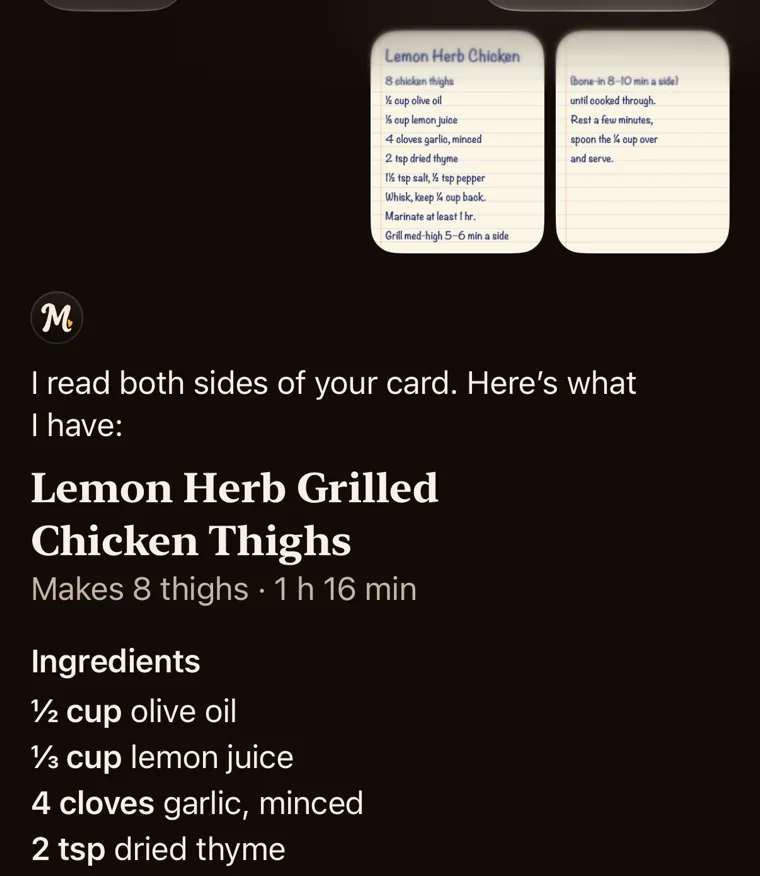
You can type them in yourself, which takes a few minutes a card. Or use a recipe app that reads handwriting. Mawmaw’s was made for this: photograph the card, both sides if you need to, and it reads it, asks about what the card leaves out, and gives you the ingredients, the steps and a timer for everything that takes time. The photo of the card stays at the bottom of the recipe. It can misread a faded word, so check the amounts against the card before you cook.
Put the originals somewhere safe
Digitizing isn’t a reason to throw the cards away.
- Use sleeves or a box labeled acid-free or archival.
- Keep them cool, dry and dark, not in the kitchen, where heat, steam and grease reach them.
- Don’t laminate or tape them, and leave the rubber bands off. Both do more harm than good over the years.
Make sure there’s more than one copy
A family recipe on one phone is only a little safer than one card in one box. Keep a backup, and hand copies to the people who should have them. In Mawmaw’s every recipe stays on your phone and in your own iCloud or Google account, and a recipe you share is a link that opens in any browser, so a cousin without the app can still read it.
Questions
Can an app read cursive handwriting?
Often, yes, even on old cards. Faded ink, pencil and very loose cursive are harder. Take a sharp photo in good light, and check the amounts against the card before you cook.
Do I need a scanner to digitize recipe cards?
No. A phone camera in daylight is enough for most cards. A flatbed scanner helps with cards that are fragile or badly faded.
What should I do with the original cards?
Keep them. Store them in acid-free sleeves or an archival box, somewhere cool, dry and dark, away from the kitchen.
How do I share family recipes with relatives?
Send each person the photo and the text together. In Mawmaw’s you send a link that opens in any browser, with or without the app, and you can stop sharing at any time.
What does it cost to digitize recipe cards?
Photographing and typing them yourself costs nothing. Mawmaw’s is $6.99 once (CA$9.99 in Canada), with no subscription and no account.
Start with the card you’d hate to lose
Mawmaw’s is a recipe app for iPhone and Android.